gander / compared with htop

gander vs htop

The same process data and the same keybindings, with the details of the selected process beside the list instead of on a screen you have to leave it to reach.

Use htop if you want the tool that ships with every distribution and nothing else. Use gander if you already know htop's keys and want the inspector without giving up the table.
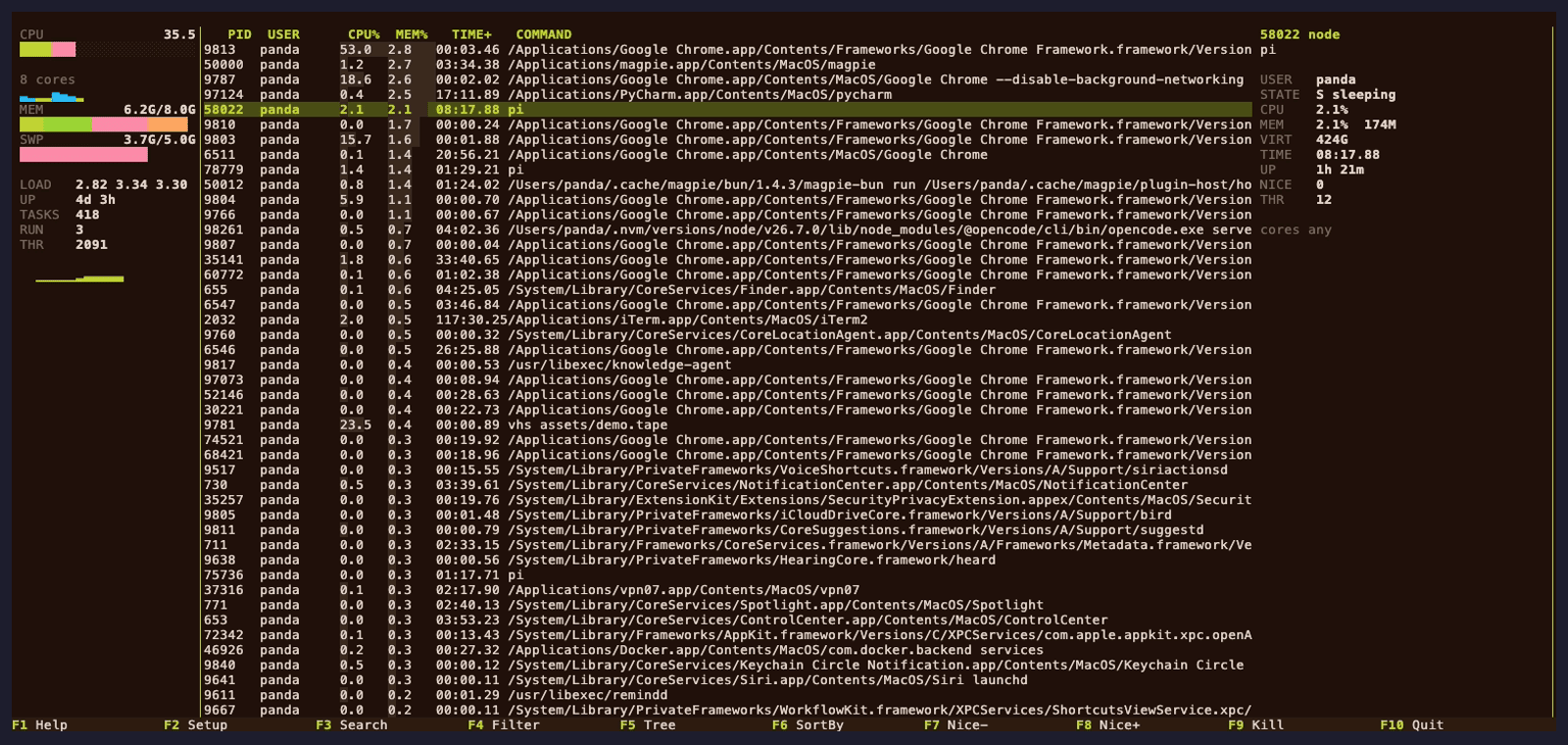
gander's panels layout: the process table stays visible while the inspector on the right shows the selected process's command line, state, memory and runtime.
Selecting a row answers the question without leaving the list. L gives you htop's own arrangement.

The one difference that changes how you work

htop answers "what is running" by showing every process at once, and then answers "what is that process doing" on a different screen — the info panel in older versions, or a separate view in newer ones. Either way the table disappears while you read it.

gander keeps both on screen. The inspector is a column beside the table, and it follows the cursor, so moving down the list re-reads the details instead of requiring a keypress per process. On a wide terminal that is free space doing work; on a narrow one the layout degrades rather than overlapping.

If you would rather have htop's arrangement, press L. The full-width layout is built in and the choice is remembered.

Side by side

ganderhtop
Reads /proc on Linuxyesyes
Linux, macOS and FreeBSDall threeall three
htop's keybindings (F1–F10, t, k, /, \)yes—
Reads an existing htoprc--import-htoprc—
Selected process's details visible while the table is visibleyesno
Tree viewyesyes
Search, filter, sort, renice, send signalyesyes
Header meters, per-core grid, themesyesyes
CPU affinity editingLinux, FreeBSDLinux, FreeBSD
--json batch mode without the TUIyesno
PSS/EPSS, PSI, zram/zswap, GPU, delay accounting, containersLinuxno
Written inRustC
LicenseGPL-2.0-or-laterGPL-2.0-or-later

htop is the reference for most of this table, and gander takes its column semantics and keybindings from it deliberately. The rows where gander is not simply "htop plus a panel" are the last three: the batch mode, the Linux-only extra columns, and the fact that htop has no equivalent of the inspector.

Switching without redoing your setup

htop keeps its settings in htoprc. gander reads that file and writes its own TOML from it, so the columns and sort order you tuned over the years come across:

gander --import-htoprc ~/.config/htop/htoprc --save

Without --save the import is a dry run that prints what it would change. Your htoprc is not modified, so htop keeps working exactly as before and you can compare the two side by side.

The importer handles htop's one-based column ids, which is where a naive conversion goes wrong. If a setting has no gander equivalent it is reported rather than silently dropped.

Keys that differ

Everything in htop's function bar stays where htop put it. These do not:

Ihtop inverts the sort order. gander cycles the selected header meter's mode; use F6 / < > to change the sort.
LSwitch between the panels and htop layouts. Not in htop.
+ / -Faster or slower sampling.
Shift+Left / Shift+RightMove the header meter cursor.

The full keymap, including the batch-mode flags, is in docs/KEYS.md.

Install

brew install pandasir/tap/gander     # macOS
cargo install gander-bin             # any platform with Rust

Linux packages for Debian, Ubuntu, Fedora and RHEL are on a signed repository, and every release ships archives for macOS (Apple Silicon and Intel), Linux (x86_64 and arm64) and FreeBSD. See all install options.

There is no AUR package yet: AUR account registration has been closed since the June 2026 malicious-packages incident and there is no manual process to create one. Arch users build from the same PKGBUILD that would have been published — see Install.

Keep reading